Overview
You can improve the look and feel of your itinerary by editing content directly in the preview.
Inline editing allows you to add titles, descriptions, and structure content in a way that enhances the overall presentation.
Editing content in the preview
- Open the Edit view
- Click directly into the preview
- Select a text block, title, or description
- Start typing to edit the content
Changes are applied immediately.
Adding descriptions and context
You can use inline editing to:
- Add an introduction at the top of the trip
- Write descriptions for days or sections
- Adding day titles
- Provide additional context for clients
Adding text content
You can add text blocks to your itinerary:
- In the itinerary view, click “Add Item”
- Select a text item
- Click “Done” to add it to the day
- You can edit these sections directly in the preview
This adds narrative structure to the trip.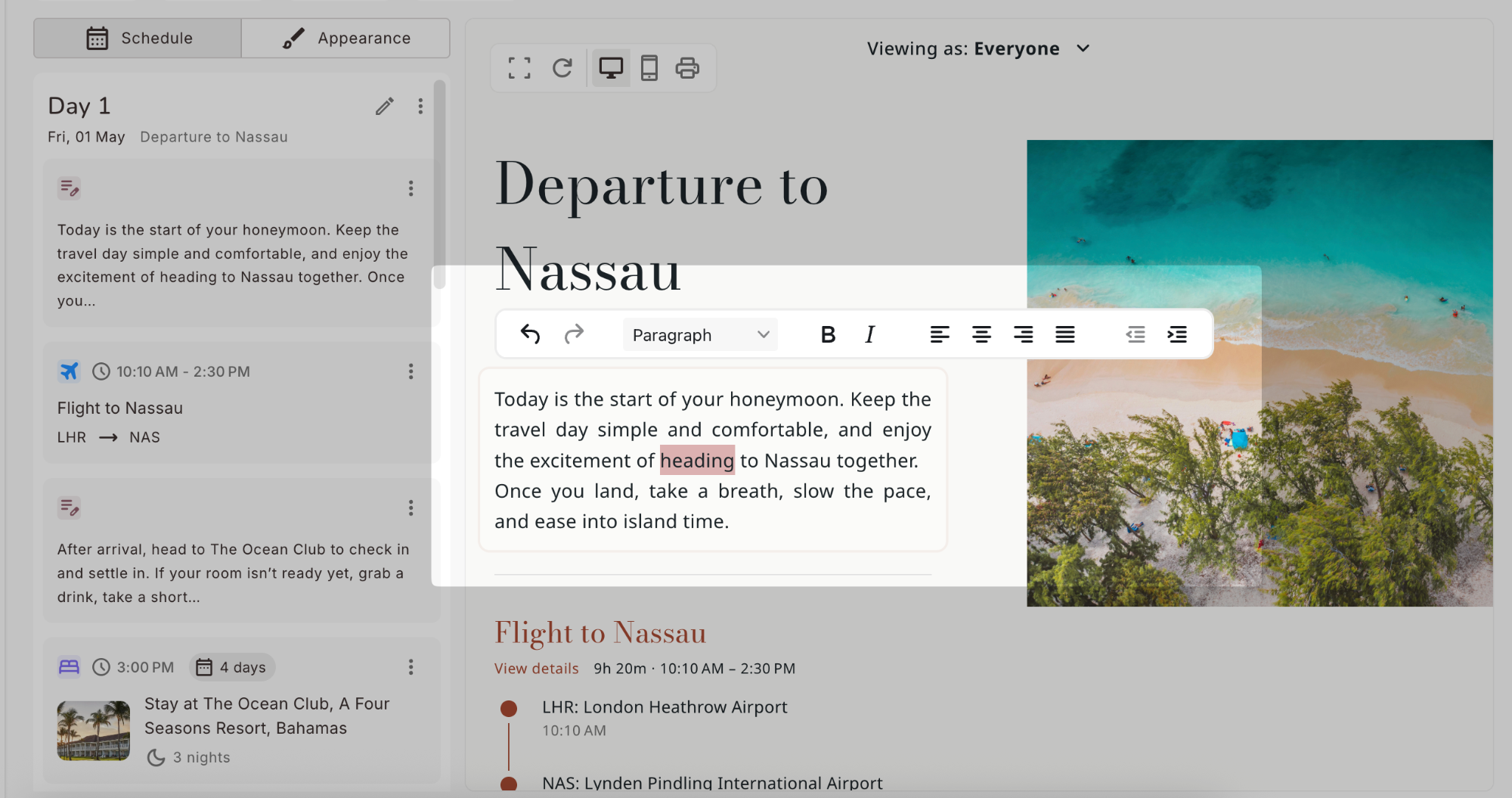
Using formatting
When editing text, the formatting toolbar appears.
You can use it to:
- Emphasize important parts of the content
- Structure longer descriptions
- Improve readability
Result
Your itinerary becomes more engaging and easier to understand, with clear structure and well-presented content.
Tip
Use short descriptions and clear headings to guide clients through the itinerary.